How to Choose the Right Technology Stack for Your MVP

Key Takeaways
MVP Stack Decision Triangle
Your tech stack choice must optimize three critical factors:
- Team Skills - What does your team already know?
- Timeline - How fast do you need to ship? (Target: 6-8 weeks)
- Budget - What can you afford? ($50-400/month for MVP)
Choose the stack that optimizes these three, not hype or trends. Selecting the right tech stack for MVP development is not just a technical decision. It is a foundational choice that determines whether your startup launches on time or watches competitors capture your market.
The technology you choose directly influences how your product functions, scales, and adapts to user needs. Beyond technical performance, your stack affects marketing effectiveness and user acquisition speed. A well-chosen tech stack for MVP enables rapid feature deployment, supports SEO optimization, and reduces time-to-market by 40-60%.
Here's what matters most: 42% of startups fail because they build products nobody wants, while another significant portion fails from choosing the wrong technology and burning through the runway before validation. Your framework, database, and hosting decisions can cut development time in half or double it.
This guide shows you how to select the right stack without over-engineering or creating technical debt. You will learn which technologies ship products faster, save money at different scales, and avoid expensive mistakes. When building an MVP, speed and pragmatism beat perfection every time.
Understanding MVP Tech Stacks: What You Need to Know
Building a successful MVP starts with understanding what technology you need and why you need it. Your tech stack is not just a collection of tools it is the foundation that determines your product's speed, scalability, and ability to adapt to user feedback. Getting this right from the start saves months of development time and thousands of dollars in unnecessary costs.
What Is an MVP in Tech?
An MVP (minimum viable product) in tech is the simplest version of your product that solves a core problem for users. You build just enough features to validate your business idea and gather feedback. Nothing more, nothing less.
The goal is testing your hypothesis with real users while spending minimal resources. Most successful startups launch with 3-5 core features, not 20. Instagram started as a photo-sharing app with filters. Dropbox began with basic file syncing. Both proved demand before building advanced features.
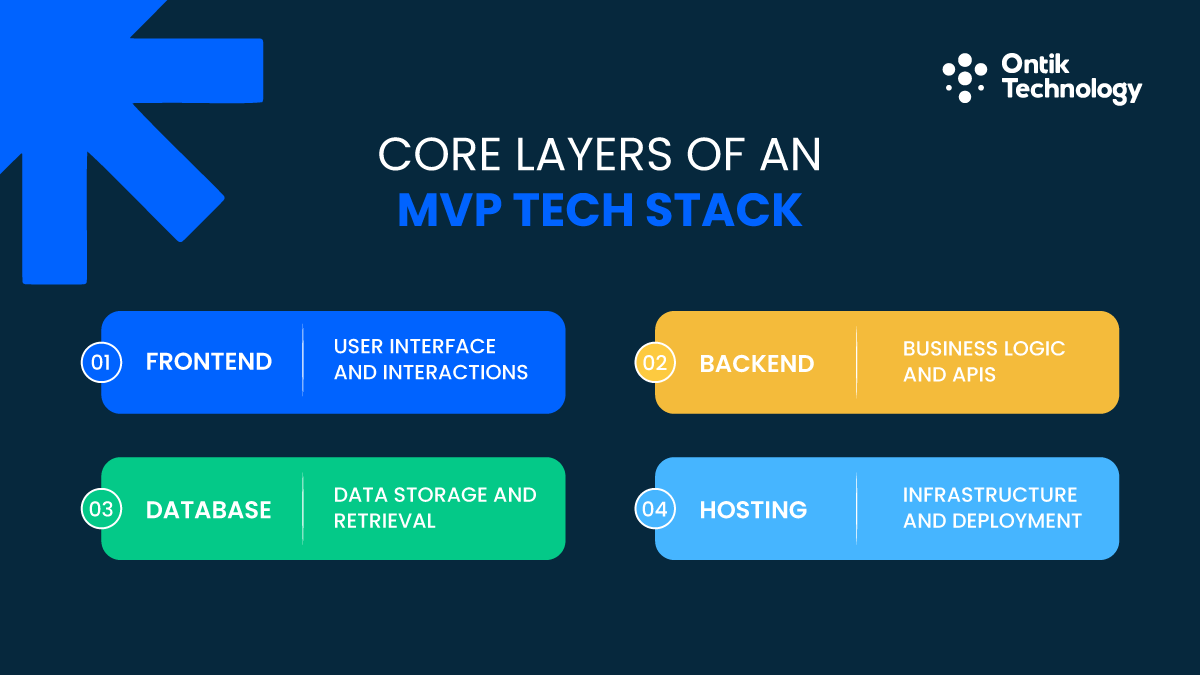
Core Layers of an MVP Tech Stack
Your tech stack for MVP consists of four essential layers working together. The frontend handles everything users see and interact with. The backend processes business logic and manages data. The database stores user information and application state. Finally, hosting keeps everything running and accessible 24/7.
Essential tech stack layers:
MVP Stack Architecture Flow
Frontend → Backend → Database → Hosting
The difference between a $5,000 stack and a $50,000 stack comes down to automation versus manual management. Startups using managed services like Vercel hosting and Supabase database launch in 6 weeks. Teams building custom infrastructure spend 6 months reaching the same milestone.
Six Critical Decision Factors
Use this framework to evaluate your technology choices objectively:
Team expertise drives 60% of your development speed. If your developers know Python, choosing it over an unfamiliar language saves 4-6 weeks of learning time. Similarly, time-to-market separates winners from competitors since every delayed week lets rivals gain ground.
Budget constraints shape realistic choices. A managed database like Supabase costs $25 monthly while self-hosted PostgreSQL on AWS requires DevOps expertise at $200+ monthly. Additionally, scalability needs depend on the growth trajectory, but planning for a million users when you have zero wastes precious time.
Security requirements vary by industry. Fintech applications need encryption and audit logs from launch while content platforms add security features after validating demand. Lastly, maintenance costs compound over time, so choose technologies with active communities providing free updates and long-term support.
Must-have now versus postpone later:
Launch with these essentials:
- User authentication and authorization
- Database with automated backups
- Basic error tracking and monitoring
- Payment processing (if revenue-critical)
- Hosting with SSL certificates
- Simple analytics tracking
Skip these until post-MVP:
- Microservices architecture
- Custom DevOps pipelines
- Machine learning features
- Native mobile apps (try PWA first)
- Complex admin dashboards
- Blockchain integration
Your MVP should prove one thing: people want what you are building. Everything else distracts from that goal. Start with proven technology—PostgreSQL powers billion-dollar companies and React runs 40% of the web.
Frontend Framework Wars: React, Vue, Svelte & Next.js
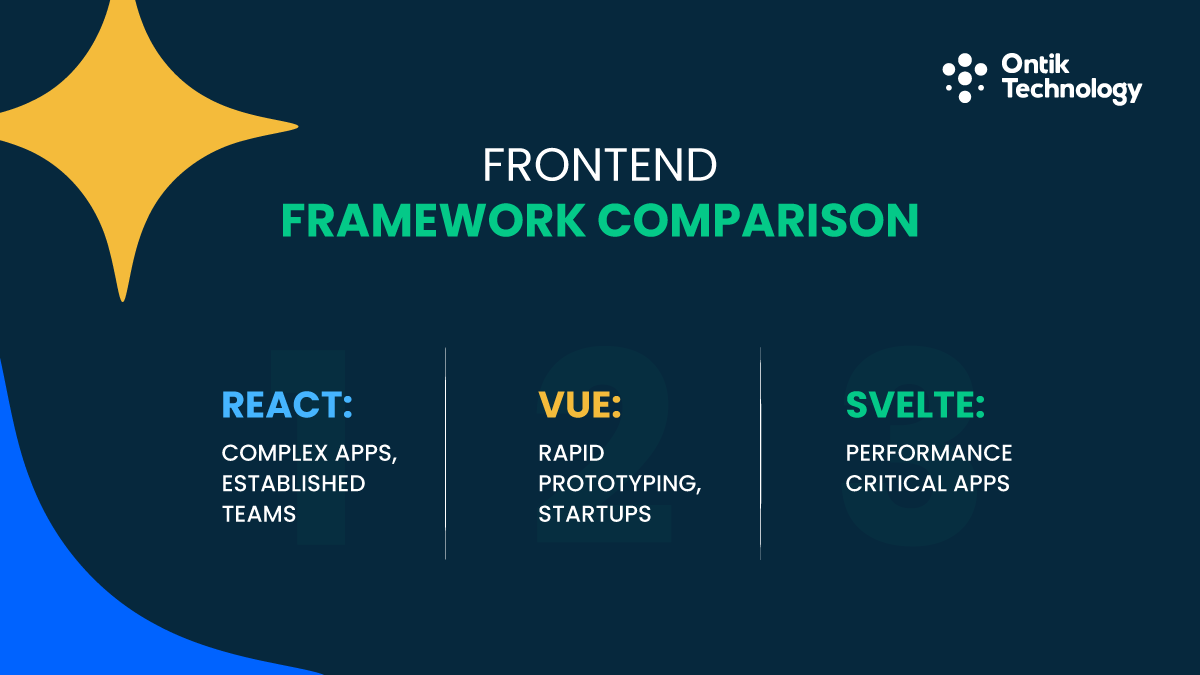
The frontend framework you pick determines how quickly you ship features and find developers who can help. Three frameworks dominate MVP development in 2026, each offering distinct advantages.
Framework comparison for MVP speed:
React dominates because its ecosystem is massive. You find React developers in every tech hub from San Francisco to Dubai to London. Component libraries like Material-UI and Chakra UI provide pre-built buttons, forms, and layouts saving weeks of design work. The framework powers Facebook, Instagram, and Netflix.
Meanwhile, Vue offers the best developer experience for small teams. The framework is intuitive and documentation is excellent. You go from idea to working prototype faster than React. Vue is popular in Asian and European markets, making it easier to find affordable developers.
On the other hand, Svelte compiles code at build time instead of running a framework in browsers. This creates incredibly fast applications with less code. Choose Svelte when performance matters more than team scalability, though the hiring pool is smaller.
Why Next.js Dominates MVP Development
Next.js has become the default choice for web MVPs because it solves problems that used to require weeks of configuration. The framework combines React with server-side rendering, meaning pages load 40% faster on average compared to standard React apps.
SEO benefits matter more than founders realize. Google crawls and indexes Next.js pages properly from day one. A React single-page app needs extra configuration to avoid blank-page problems hurting search rankings. For most web development projects, Next.js offers the fastest path from concept to launch.
Deployment becomes ridiculously simple with Vercel, which created Next.js. You connect GitHub and every code push automatically deploys to production. No server configuration or DevOps expertise required. The free tier handles thousands of visitors before you pay anything.
Routing works intuitively with file-based navigation where creating a new page is as simple as adding a file. Next.js includes built-in image optimization, automatic code splitting, and API routes that let you build backend endpoints inside your frontend project. These features cut development time by 30% compared to custom React setups.
UI Component Libraries That Accelerate Development
You should not design buttons and forms from scratch when pre-built solutions exist. Tailwind CSS gives you utility classes to style components without writing custom CSS. The combination of Tailwind and shadcn/ui has become the new standard for startups.
Material-UI works well if you want a Google-style interface without design decisions. Chakra UI combines simple APIs with accessible components that work out of the box. Choosing a component library saves 100+ hours you would spend building basic UI elements, letting you focus on features that differentiate your product.
Working with experienced teams like Ontik Technology ensures you pick the right frontend stack and implement best practices from day one, avoiding costly refactoring later.
Backend Technology: Choosing Your Server-Side Stack
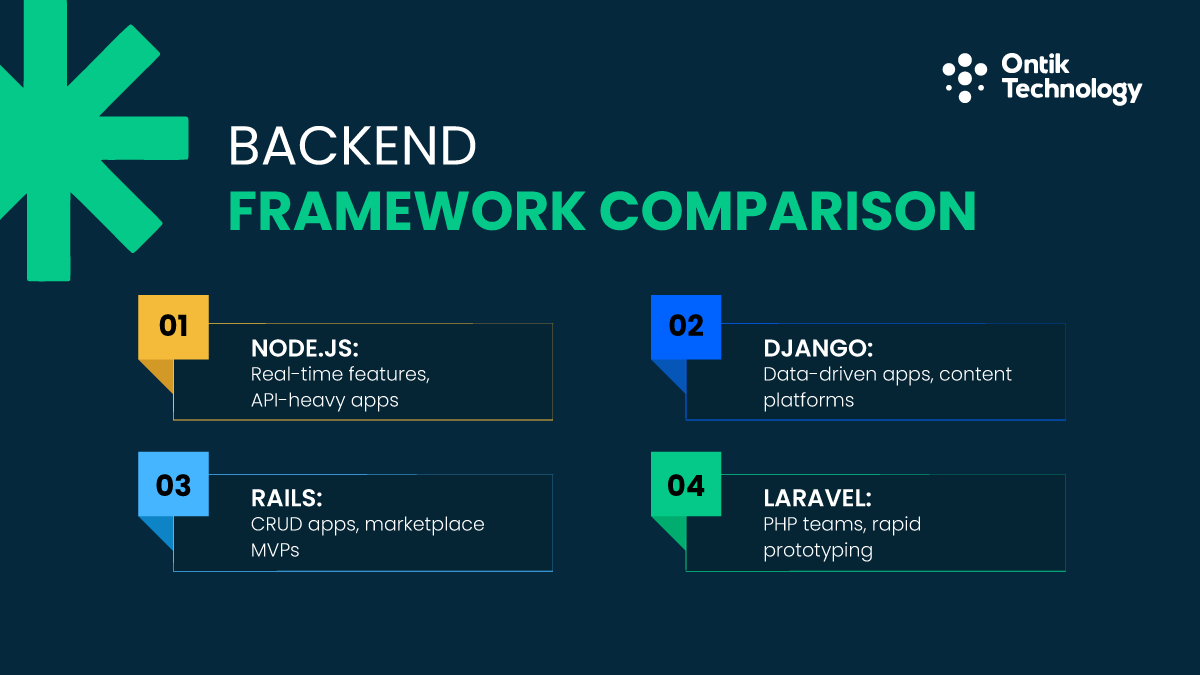
Your backend choice determines how fast you implement business logic, handle user data, and scale when traction hits. Four frameworks dominate MVP backend development, each with distinct strengths.
Backend framework comparison:
Node.js with Express or NestJS dominates when you want JavaScript across your entire stack. Your frontend and backend developers speak the same language, share code, and move faster. The npm ecosystem offers packages for every imaginable feature, while Node.js excels at real-time applications like chat and notifications.
Conversely, Django gives you an instant admin panel that saves weeks of development time. You define data models and Django generates a complete admin interface for managing users, content, and settings. The Python framework includes authentication, database migrations, and security features by default.
Ruby on Rails pioneered "convention over configuration" that makes developers productive. Rails includes generators creating entire features with single commands. The framework works exceptionally well for marketplace MVPs and CRUD applications where you need standard create-read-update-delete functionality quickly.
Serverless vs Traditional Backend
Serverless architecture means writing functions that run on-demand without managing servers. AWS Lambda, Google Cloud Functions, and Vercel Functions charge only when code executes. A traditional server costs $20-200 monthly whether anyone uses your app or not.
Serverless works perfectly for APIs receiving sporadic traffic, background jobs like sending emails, webhooks triggering from external services, and MVPs testing product-market fit with minimal users. Traditional backends make more sense when you need complex business logic running continuously or WebSocket connections for real-time features.
Cost comparison:
Serverless vs Server: When to Switch
Break-even Cost Analysis
Understanding when to migrate from serverless to dedicated servers:
At 1,000 requests/day:
- Serverless (AWS Lambda): $1/month
- Dedicated Server: $20/month (paying for idle capacity)
- Winner: Serverless
At 100,000 requests/day (Break-even point):
- Serverless: $50/month
- Dedicated Server: $50/month
- Winner: Equal cost
At 200,000+ requests/day:
- Serverless: $100+/month (continues scaling)
- Dedicated Server: $50/month (fixed cost)
- Winner: Dedicated Server
Cost Curve Summary
The Serverless Tradeoff
Cold starts create the main serverless drawback where functions that have not run recently take 500-3000ms to initialize.
Recommendation: Start with serverless if testing an idea with minimal infrastructure costs, then migrate to traditional servers when traffic patterns justify it (typically at 100K+ daily requests with proven product-market fit).
REST vs GraphQL for MVP APIs
REST APIs are simple and well-understood, ideal for most MVPs due to their low setup. GraphQL allows clients to request specific, combined data in a single query, offering superior flexibility.
It suits complex apps with multiple frontends or mobile users needing network efficiency. For initial development, REST is recommended 80% of the time. Migrate to GraphQL only when specific needs like flexible data or multiple client requirements emerge.
Database Selection: SQL vs NoSQL for Your MVP
Your database choice affects how you structure data, handle scaling, and implement features. The decision comes down to whether you need strict data relationships or flexible document storage.
Database decision matrix:
PostgreSQL excels for relational data, enforcing integrity for structured use cases like SaaS. SQL queries powerfully join and analyze this data.
MongoDB fits scenarios requiring flexible schemas, like content systems, as adding fields requires no migration. For most SaaS MVPs, PostgreSQL is the recommended choice, safely scaling to millions of rows with mature tooling.
Multi-Tenancy for SaaS MVPs
Multi-tenancy means multiple customers use your application while their data stays completely separate. The architecture you choose affects security, performance, and costs as you scale.
Row-level security in PostgreSQL enforces data isolation at the database level. You set policies automatically filtering queries by the logged-in user's tenant. Even if application code has bugs, the database prevents cross-tenant data leaks. This approach provides strong security while keeping operational costs low.
At 100 customers, a single database with row-level security costs $50 monthly on managed PostgreSQL. At 1,000 customers, costs increase to $200-300 monthly. Start with single database and PostgreSQL's row-level security to balance security, simplicity, and cost for MVPs.
Ontik Technology's expertise in business intelligence analytics ensures your database architecture supports both current needs and future growth.
Do You Really Need Redis?
Founders often add Redis caching because "fast apps need caching." This wastes time implementing infrastructure you do not need yet. PostgreSQL and MySQL include query result caching by default. For MVPs serving 100-1,000 users, built-in caching handles load perfectly fine.
You actually need Redis when running multiple application servers needing shared session storage, implementing rate limiting to prevent abuse, or building real-time features like leaderboards. Launch without Redis and add it when specific performance problems emerge. Modern managed services like Upstash offer serverless Redis integrating in an afternoon when you actually need it.
Mobile MVP: Native vs Cross-Platform Solutions
Building native iOS and Android apps separately doubles your development cost and timeline. Cross-platform frameworks let you write code once and deploy to both platforms, dramatically reducing time and expense.
Mobile framework comparison:
React Native allows JavaScript developers to build native mobile apps using a shared codebase, backed by large developer communities.
Flutter uses Google's Dart language for high-performance apps with a unique widget system for rapid UI development. For most SaaS or marketplace apps, both frameworks deliver excellent performance.
The deciding factor is typically your team's existing expertise in JavaScript or Dart, rather than technical benchmarks.
Expo for Rapid Mobile Shipping
Expo simplifies React Native development by managing app builds, push notifications, and updates without native code. Unlike standard React Native, which requires local installation of Xcode and Android Studio, Expo offers a cloud development environment. Users scan a QR code to run their app instantly, saving 3-4 days of initial setup time.
Expo unifies push notifications across platforms (Firebase and APNS) with a simple API. Essential MVP features, including authentication, data display, forms, media uploads, and push notifications, are covered by Expo.
When PWAs Beat Native Apps
Progressive Web Apps are websites behaving like native apps. Users access them through browsers or install them to home screens. This approach saves massive time and money when testing product-market fit.
Building separate iOS and Android apps costs $30,000-80,000 and takes 12-20 weeks. A PWA costs $5,000-15,000 and ships in 4-6 weeks. You deploy updates instantly instead of waiting for App Store review. Users always see the latest version without downloading updates.
Five reasons to choose PWA for MVP:
- Single codebase serves web, iOS, and Android users from the same code
- No app store approval means you ship features daily instead of weekly
- Lower development costs because you build one interface, not three
- Easier user acquisition since users click links instead of downloading apps
- Real-time testing and iteration happen without version fragmentation
PWAs cannot access hardware features like Bluetooth or advanced camera controls. However, these constraints do not affect most business tools, content platforms, or SaaS products. Choose PWA when core features work in browsers and you want maximum reach with minimum development cost. For specialized mobile app development needs, native or cross-platform solutions remain essential.
Infrastructure: Hosting, Deployment & Monitoring
Where you host your MVP affects deployment speed, costs, and global performance. The right platform lets you push code and go live in minutes instead of managing servers.
Hosting platform comparison:
Vercel, the creator of Next.js, offers optimized hosting with automatic GitHub deployment, instant preview URLs, and handles SSL, CDN, and serverless functions effortlessly.
Render provides traditional server hosting for web services, PostgreSQL, Redis, and cron jobs, ideal for persistent server applications like Django, Rails, and Node.js.
Railway balances simplicity and power, automatically detecting and configuring your framework. All three platforms offer a free start and scale with demand.
Minimal CI/CD Setup for MVPs
Continuous Integration and Continuous Deployment mean code automatically tests and deploys when you push changes. This automation prevents bugs from reaching production and lets you ship features confidently. The average MVP team saves 5-10 hours weekly with proper CI/CD setup.
Four essential CI/CD steps for MVPs:
- Connect GitHub to your hosting platform - Vercel, Render, and Railway deploy automatically when you push to main branch (5 minutes setup)
- Add automated tests running on every pull request using GitHub Actions free tier (30 minutes to configure)
- Create staging environment mirroring production where you test changes before merging
- Implement environment variables for secrets and config instead of committing API keys to code (15 minutes setup)
Time investment is about 2 hours total to set up proper CI/CD. Modern platforms make DevOps accessible to teams without specialists.

Essential Observability for MVPs
You need to know when your MVP breaks, which features users actually use, and where performance problems occur. According to industry data, 78% of startups discover critical bugs only after users report them, costing an average of 15 hours per incident in lost productivity and reputation damage.
Four essential metrics to track:
- Error rate and stack traces - Shows exactly what breaks and why
- Response times - Identifies slow APIs killing user experience
- Uptime monitoring - Alerts you within minutes when your app goes down
- User actions - Reveals which features get used and which get ignored
Sentry handles error tracking perfectly for MVPs. The service captures every JavaScript error, API failure, and database timeout with full context. The free tier supports 5,000 errors monthly. Uptime monitoring through Better Uptime or UptimeRobot pings your application every minute and sends alerts when it goes offline at $5-10 monthly.
Application performance monitoring with Vercel Analytics shows response times and bandwidth usage. These built-in tools cost nothing and reveal performance issues before users complain. The total monitoring cost runs $0-25 monthly depending on traffic. Ontik Technology's cloud solutions include comprehensive monitoring setup ensuring you catch issues before they impact users.
Critical Third-Party Services You Should Not Build
Building authentication yourself takes 2-3 weeks and creates security risks. Managed auth services give you production-ready login systems in hours, letting you focus on features that differentiate your product.
Authentication service comparison:
Author offers comprehensive enterprise features, including social logins, MFA, and advanced security, ideal for immediate large-scale needs. Supabase integrates authentication with PostgreSQL and file storage, offering a generous free tier suitable for bootstrapped startups.
Clerk provides ready-to-use, aesthetically pleasing UI components for React apps, making signup, login, and user management effortless.
All three expertly manage password resets, email verification, and OAuth. Given the reputational risk of authentication security flaws, it is essential to rely on these expert services.
Payment Integration Essentials
Stripe is the dominant choice for MVP payments, charging 2.9% + $0.30 per transaction. Its robust API validates revenue models quickly. Paddle acts as merchant of record, simplifying tax compliance for 5% + $0.50 per transaction.
On $10,000 monthly revenue, fees are $320 with Stripe versus $550 with Paddle. While Stripe's lower cost suits early startups, Paddle's automation can justify its fee for EU or UAE companies handling complex cross-border VAT.
Email, SMS & Analytics
For transactional emails (password resets, order confirmations), start with Resend for its simple API, reliable delivery, and React component templates. It offers a free tier (100 daily emails); switch to Sendgrid later for lower costs as volume increases.
For analytics, use both Plausible and Mixpanel. Plausible provides privacy-friendly web analytics (GDPR compliant, no cookies) for $9/month (10k views). Mixpanel offers product analytics on user behavior with a free tier (100k monthly users).
Plausible tracks website traffic, while Mixpanel tracks in-app behavior. Together, they cost $20-$40 monthly and offer full visibility into growth metrics simply.
Industry-Specific MVP Tech Stacks
Different products need different technical foundations. Here's what works for common MVP types in 2026, based on real-world implementations and proven patterns.
Complete SaaS MVP Stack
This stack handles complete SaaS workflow from user signup through payment processing at $50-150 monthly depending on traffic. Multi-tenancy works naturally with PostgreSQL row-level security where each customer's data stays isolated while you manage a single database.
A project management SaaS built with this exact stack launched in 8 weeks, acquired 500 paying customers in 6 months, and scaled to $50,000 monthly recurring revenue without changing core architecture. Working with MVP development services providers like Ontik Technology helps you implement this stack correctly from day one.
Marketplace MVP Requirements
Marketplaces connect buyers with sellers, creating unique technical challenges around search, messaging, and payment flows. The average marketplace MVP requires 30-40% more development time than standard SaaS applications due to two-sided platform complexity.
Four technical priorities for marketplace MVPs:
- Robust search and filtering - Users abandon marketplaces where they cannot find what they want; implement full-text search using PostgreSQL's built-in capabilities or Algolia
- In-app messaging - Use Sendbird or Stream Chat for managed messaging keeping conversations in your platform ($50-200 monthly)
- Escrow payment handling - Stripe Connect lets you hold payments until sellers fulfill orders, handling splits, refunds, and platform fees automatically
- Trust and safety - User verification, reviews, and dispute resolution prevent fraud and build marketplace credibility
Recommended marketplace stack: Next.js frontend with advanced filtering UI, Node.js backend handling complex business logic, PostgreSQL with full-text search indexes, Stripe Connect for payments, Sendbird for messaging, and Cloudinary for image hosting. This handles two-sided marketplaces from launch through thousands of listings at $100-300 monthly initially.
Real-Time & Fintech Stacks
Supabase Realtime enables instant updates for features like live chat via database change broadcasts. Fintech compliance dictates technology choices: PCI-DSS (USA), GDPR/PSD2 (EU), and data residency (UAE).
The stack uses proven vendors: Stripe/Ayden (payments), AWS/Google Cloud (hosting), PostgreSQL (audits), and Auth0 (MFA). Budget 20-30% more development time for implementing required encryption and logging from the start.
AI MVP Integration
Building AI features means integrating large language models and managing costs scaling with usage. OpenAI's GPT-4 dominates AI MVP development because the API is simple at $0.03 per 1,000 input tokens and $0.06 per 1,000 output tokens. A typical chat interaction costs $0.01-0.05 depending on conversation length.
Prompt engineering reduces costs by 50-70% because well-crafted prompts generate quality output in fewer tokens. Cache frequent requests to prevent calling API repeatedly for identical inputs. An AI MVP with 1,000 users averaging 50 interactions monthly costs $1,500-2,500 in API fees. Ontik Technology's expertise in AI and machine learning helps optimize these costs while maintaining quality.
Stack Comparisons: Making the Final Decision
Choosing between popular full-stack frameworks determines how quickly you ship and how easily you scale. Here's how modern options compare for MVP development in 2026.
Full-stack framework comparison:
The MERN stack offers high flexibility, fitting certain use cases well despite its configuration overhead. The T3 Stack prioritizes full-stack type safety, with tRPC catching errors before deployment to prevent bugs. Supabase provides the fastest deployment path, delivering a managed PostgreSQL database, auth, and APIs. This trades some flexibility for speed, often allowing you to ship 2-3x faster than with custom backends.
Monolith vs Microservices for MVPs
The microservices architecture splits your application into independent services communicating over networks. This sounds appealing until you understand the complexity costs that slow MVP development.
Why monolithic architecture wins for MVPs:
- 10x simpler deployment - Push one application to one server instead of orchestrating 5-20 services
- Straightforward debugging - Stack traces show exactly where errors occur without crossing service boundaries
- Normal database transactions - Update multiple tables in single transaction with rollback guarantees
- 3-5x faster development - Developers work in one codebase with fast feedback loops
- Lower infrastructure costs - Runs on $20-50 monthly server versus $200-500 for microservices infrastructure
You actually need microservices when you have hit 100,000+ monthly active users and identified specific performance bottlenecks. Amazon and Netflix started as monoliths and migrated to microservices after proving product-market fit. You can follow the same path.
Firebase vs Supabase Showdown
Firebase excels for real-time mobile apps, offering offline sync and a generous free tier. Supabase wins for web apps needing SQL flexibility, providing a powerful PostgreSQL database with row-level security. While both eliminate infrastructure work, Supabase's open-source model reduces vendor lock-in concerns, allowing for potential self-hosting.
Critical difference: Moving off Firebase requires rewriting your data layer completely because Firestore's NoSQL model differs fundamentally from SQL databases. Supabase uses standard PostgreSQL, meaning you can export data and move to any PostgreSQL-compatible host. For new MVPs in 2026, Supabase offers better long-term flexibility while maintaining rapid development speed.
Working with experienced development teams ensures you make the right architectural choices. Ontik Technology's proven development process and custom software development services help startups across USA, EU, and UAE markets launch MVPs that scale effectively.
Conclusion: Choosing the Right Tech Stack for Your MVP Success
Choosing the right tech stack for MVP development comes down to three factors: your team's skills, your timeline, and your budget. The best technology stack is the one that ships your product fastest while keeping future options open.
Start with proven technology. PostgreSQL, React, and Node.js power billion-dollar companies and will serve your MVP perfectly. Managed services like Vercel, Supabase, and Stripe let you focus on features instead of infrastructure. The biggest mistake is over-engineering before validating product-market fit.
Ship quickly, learn from users, and iterate based on real feedback. Your tech stack should accelerate learning, not impress other developers. Make the practical choice that lets you launch in weeks instead of months. The perfect tech stack for your MVP is the one that exists in production serving real users.
FAQs
What's the cheapest tech stack for MVP development?
The cheapest stack uses Supabase for backend and database (free tier), Next.js deployed on Vercel (free tier), and Resend for emails (free tier). You can launch an MVP spending $0-25 monthly. This combination handles thousands of users before costs increase. Add Stripe for payments only when you have customers ready to pay.
How long does it take to build an MVP with the right tech stack?
Most MVPs take 6-12 weeks with the right stack and focused scope. Next.js plus Supabase can ship in 4-6 weeks. Custom backends with Django or Rails typically take 8-12 weeks. The timeline depends more on feature scope than technology choice. Cut features aggressively and you launch faster.
Can I change my tech stack after launching my MVP?
Yes, but migration difficulty varies significantly. Switching hosting platforms takes hours. Changing databases requires weeks of work and careful data migration. Moving from Firebase to PostgreSQL often takes 2-3 months. Pick technologies with standard interfaces and avoid proprietary platforms when possible to ease future transitions.
What tech stack do successful startups actually use?
Airbnb uses Rails and React. Stripe runs on Ruby, Scala, and Go. Notion uses Next.js and PostgreSQL. Instagram started with Django and PostgreSQL. The pattern is clear: successful companies use proven, boring technology and focus on solving user problems. Your stack matters far less than your product-market fit.
Should I use no-code tools for building my MVP?
No-code tools like Bubble or Webflow work perfectly for testing ideas with non-technical founders. They let you launch in days instead of weeks. The limitation appears when you need custom features or integrations. Start with no-code if you are solo and non-technical. Hire developers and switch to code when you validate demand and raise funding.