AI Agent for Customer Support: Cost, ROI, Rollout
Your support team is spending $15 to $25 resolving tickets that follow the same script every time: password resets, order status checks, refund eligibility questions, and "how do I change my plan." These make up 50 to 70% of your inbound volume, and every one of them follows a documented procedure that does not require human judgment.
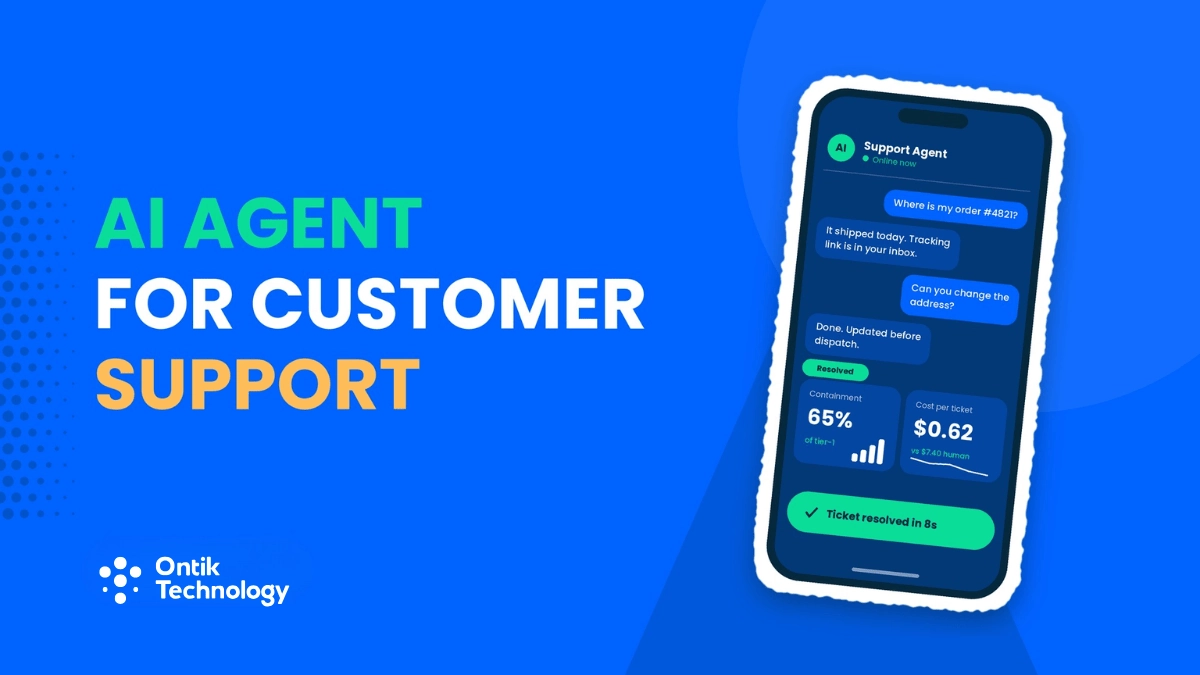
An AI agent for customer support can resolve these at $0.50 to $1.50 per ticket. That is a 90%+ cost reduction on the work your best agents should never be doing.
But you already know that. The reason you have not deployed one is not cost. It is the headline you cannot afford: "Company's AI chatbot tells customer they're entitled to a refund that doesn't exist."
That fear is rational. Ungrounded AI agents hallucinate 15 to 27% of the time in live customer support deployments. But the fix is not avoiding AI. It is containment architecture: a system design that makes hallucinations structurally impossible on the ticket types you automate, and escalates everything else to a human with full context.
This post covers which tier-1 tickets to automate first, the containment architecture that prevents hallucinations from reaching customers, the real cost math, and the implementation sequence that gets you from pilot to production without destroying CX.
The Tier-1 Cost Problem in Numbers
Most support leaders know tier-1 tickets are expensive relative to their complexity. The actual benchmarks are worse than the intuition:
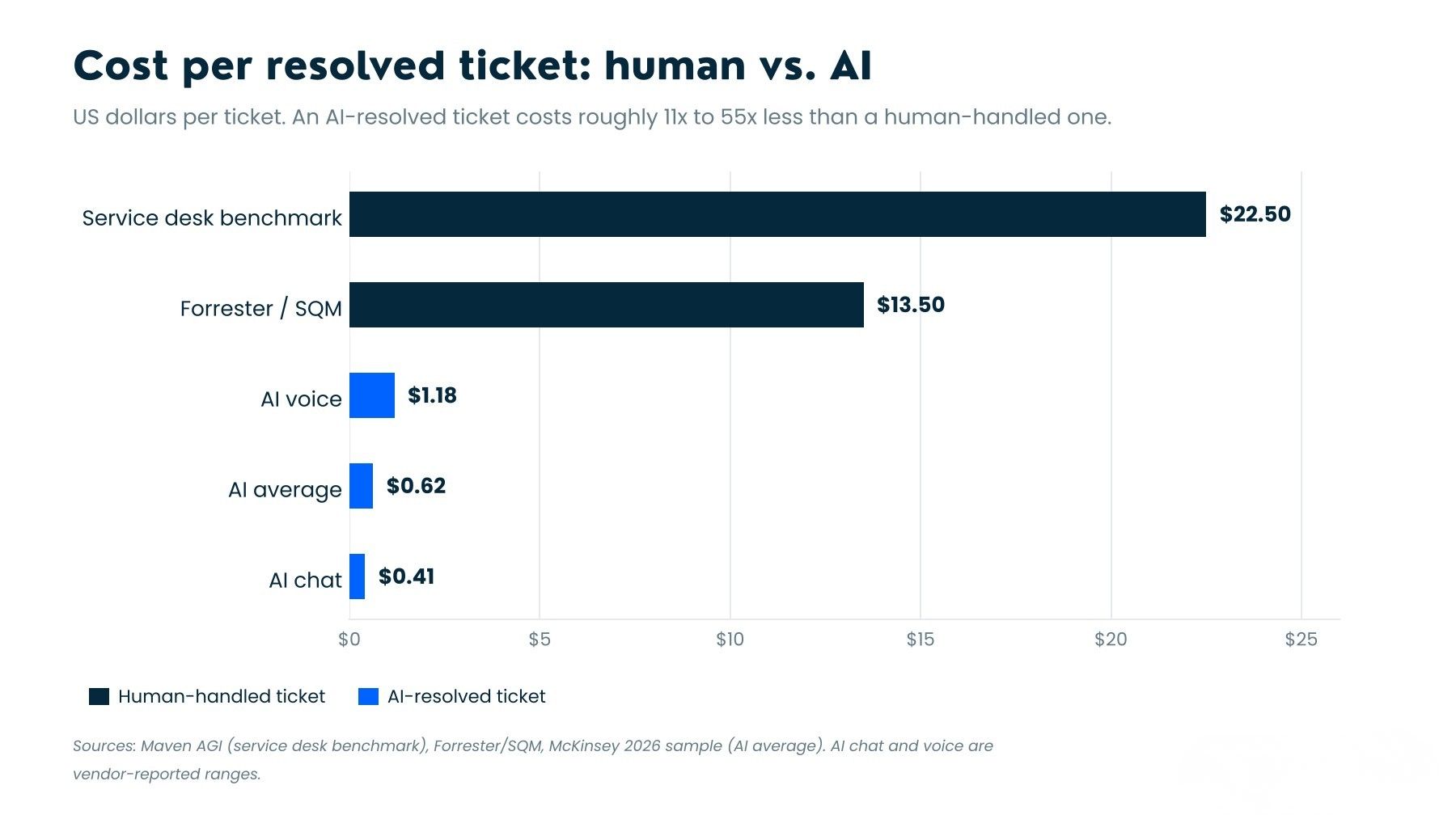
- Average cost per human-resolved ticket: $22.50 (2026 service desk benchmark, Maven AGI); Forrester and SQM Group benchmark it at $13.50 per contact on the lower end
- AI cost per resolved ticket: $0.62 average across McKinsey's 2026 AI in Customer Service sample; chat-only AI sits at $0.41, voice-AI at $1.18
- Tier-1 share of total volume: 50 to 70% of inbound tickets across most support operations
- Password resets alone: 20 to 50% of all IT help desk tickets (Gartner)
- Median tier-1 deflection rate in 2026: 41.2% across enterprise CX programs; top quartile hits 58.7% (Zendesk CX Trends, Salesforce State of Service)
Translation: if your team handles 10,000 tickets per month and 60% are tier-1, you are spending roughly $135,000 per month on work that an AI agent could handle for $3,720 to $9,000. That is $126,000 per month left on the table, or over $1.5 million per year.
Which Tier-1 Tickets to Automate First
Not all tier-1 tickets automate equally. The deflection and resolution rates vary dramatically by category. Start with the categories that have the highest containment rates AND the highest volume. That intersection is where the ROI concentrates.
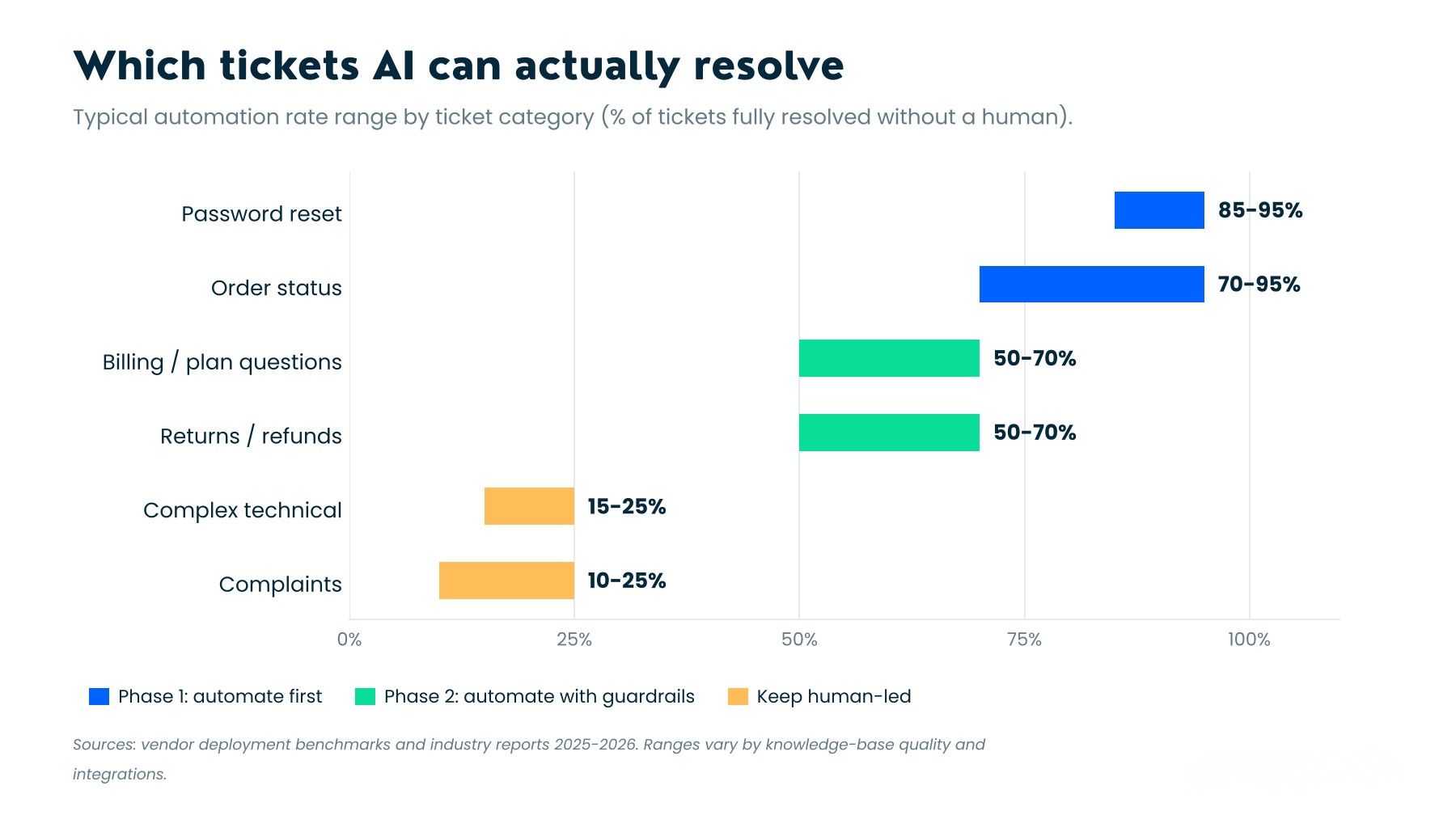
Tier 1-A: Near-deterministic (automate immediately)
Password resets and account access
Deflection rate: 70%+ (ClarityArc 2026 benchmarks)
Automation rate: 85-95% (Voiceflow production data)
Why: The resolution path is identical every time. Verify identity, trigger the reset, close the ticket. There is no ambiguity, no judgment, and no hallucination surface because the AI is executing a workflow, not generating a response.
Order status and shipment tracking
Deflection rate: 50-70%
Automation rate: 85-95% when connected to OMS
Why: "Where is my order" has exactly one correct answer, and it lives in your order management system. The AI agent reads a database, not generating text. Hallucination risk is near zero because the response is a data lookup, not a language generation task.
Tier 1-B: High-confidence with guardrails (automate in Phase 2)
Billing inquiries and plan changes
Deflection rate: 50-70%
Why: These involve structured policy data. The AI needs to render your billing rules, not interpret them. The containment risk is higher here because an AI that invents a pricing tier or a discount that does not exist creates a binding promise. Grounded retrieval plus pre-send validation catches this.
Return and refund eligibility
Deflection rate: 50-70%
Why: Policy-bound, but edge cases exist. A 30-day return window is deterministic. A "reasonable wear and tear" exception is not. The AI should resolve the clear cases and escalate the ambiguous ones.
Tier 1-C: Escalate by default (do not automate yet)
Complaints and retention conversations
Deflection rate: below 25% even in best-performing deployments
Why: These require empathy, negotiation, and judgment. An AI that "resolves" a cancellation request by confirming the cancellation is a containment success and a retention failure simultaneously.
Complex technical troubleshooting
Deflection rate: below 25%
Why: Multi-step diagnosis, environment-specific variables, and high consequence of a wrong answer. Keep humans here.
The Hallucination Problem: Real Data, Not FUD
71% of CX leaders rank hallucination as a top-three governance risk. But the actual incident rate and the perceived risk are wildly different:
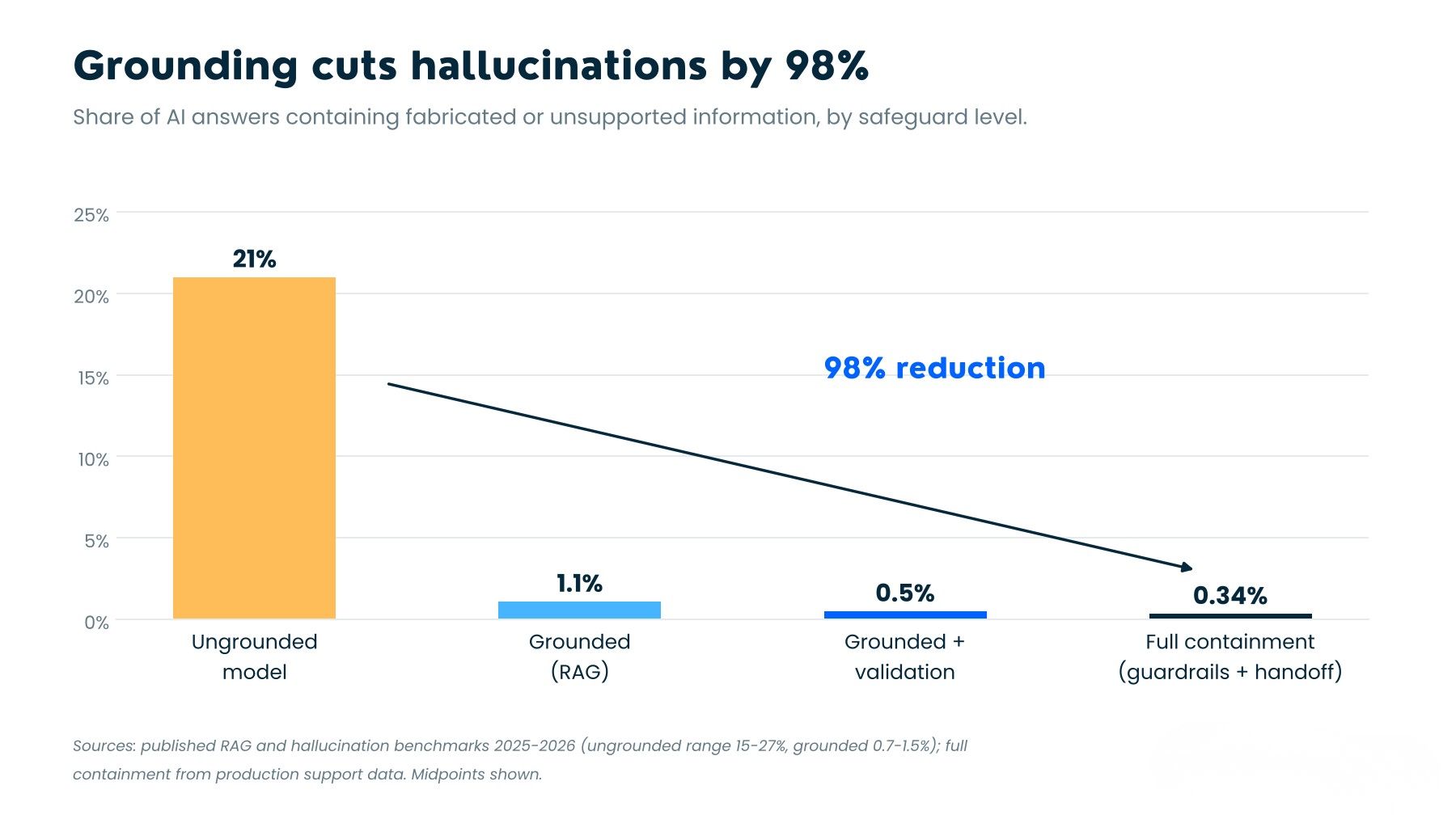
- Hallucination-related complaints: 0.34% of AI-handled tickets (McKinsey / Gartner CX 2026)
- Ungrounded chatbot hallucination rate: 15 to 27% of responses contain fabricated information (Unthread 2026 meta-analysis)
- Grounded LLM hallucination rate: 0.7 to 1.5% with proper retrieval architecture
- With dedicated hallucination removal (e.g., IrisAgent engine): below 5%, validated accuracy above 95%
- Customer trust impact: drops ~20% after one wrong answer
The gap between 15-27% and 0.7-1.5% is not a better model. It is a better architecture. The model is the same. What changes is how the system constrains what the model is allowed to say.
Containment Architecture: The Four Layers That Prevent Hallucinations
A containment architecture is the system design that ensures an AI agent cannot deliver a hallucinated response to a customer. It is not a single feature. It is four layers working together, and skipping any one of them is how the headline-making failures happen.
Layer 1: Closed-domain retrieval
The AI agent can only answer from your verified knowledge base, product documentation, and policy database. It cannot generate answers from its training data. If the answer is not in the source material, the agent does not guess. It says "I don't have that information" and escalates.
Layer 2: Deterministic process execution
For action-taking tickets (password resets, refunds, plan changes), the AI executes a predefined workflow. It does not interpret policy. It renders policy. The difference: "interpret" means the LLM decides what the rule means. "Render" means the LLM reads a structured decision tree and follows it. The business logic lives outside the model.
Layer 3: Pre-send response validation
Before any response reaches the customer, a validation layer checks it against the source documents. If the response contains information not present in the retrieved sources, it is blocked. This is the layer that catches the 0.7-1.5% residual hallucination risk from grounded models.
Layer 4: Confidence-gated escalation
The agent has a confidence threshold. Below it, the ticket routes to a human agent with the full conversation context, the retrieved sources, and the AI's draft response visible as an assist. The human reviews, edits if needed, and sends. This is not a failure. It is the system working correctly.
The architectural test: Ask your vendor what happens when the AI does not know the answer. If the answer is "it tries harder," walk away. If the answer is "it escalates with full context and the customer never sees an uncertain response," you have a containment architecture.
The ROI Math: A Worked Example
Here is a realistic projection for a mid-market support operation deploying an AI agent for customer support on tier-1 tickets.
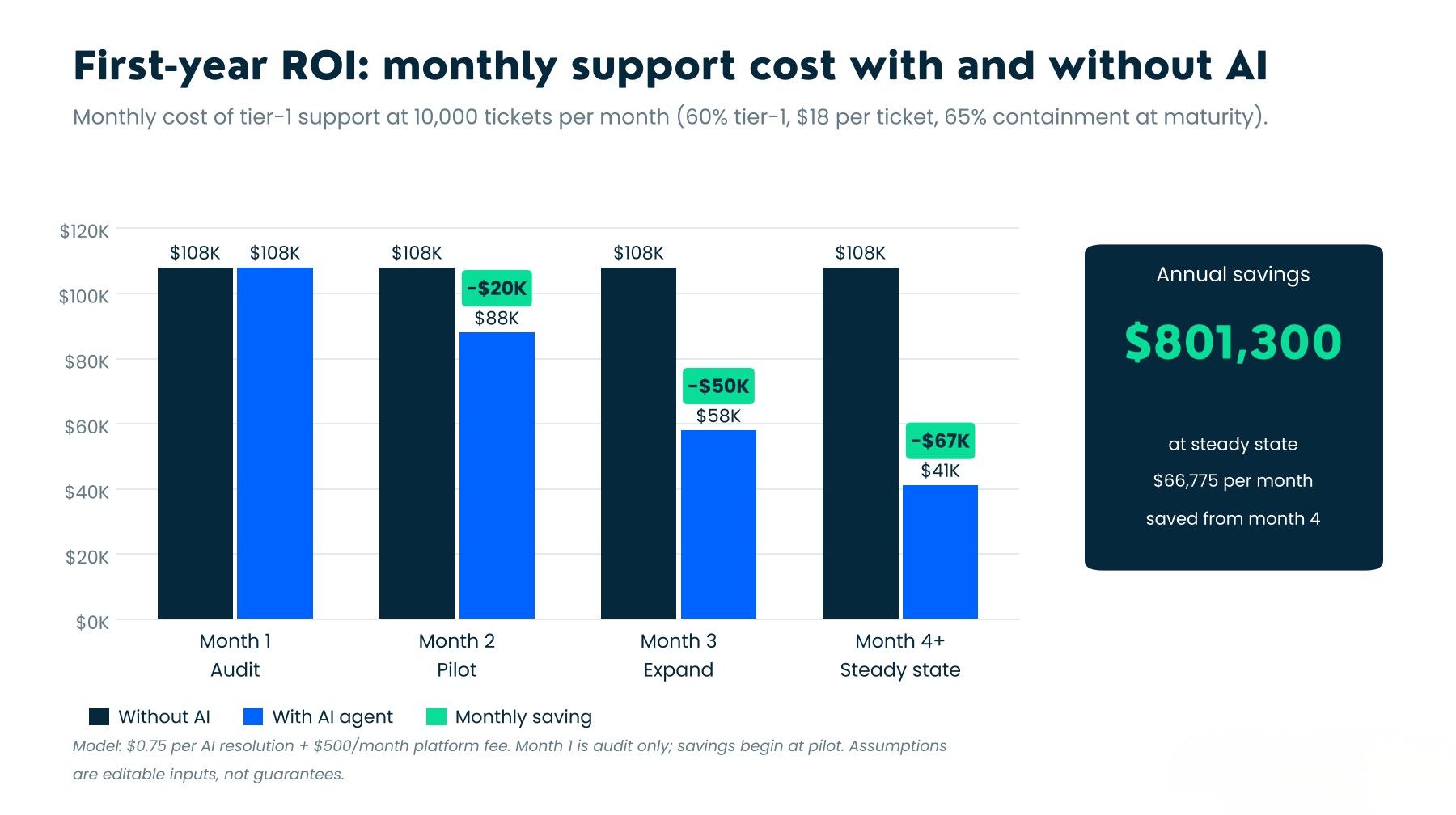
Starting conditions:
- Monthly ticket volume: 10,000
- Tier-1 share: 60% (6,000 tickets)
- Current cost per ticket: $18 (blended human cost)
- Monthly tier-1 spend: $108,000
After AI deployment (steady state, month 4+):
- AI containment rate on in-scope intents: 65% (conservative; top quartile hits 80%)
- Tickets resolved by AI: 3,900/month
- AI cost per resolution: $0.75 (mid-range per-resolution pricing)
- Monthly AI cost: $2,925 + ~$500 platform fees = $3,425
- Remaining human-handled tier-1: 2,100 tickets at $18 = $37,800
- New monthly tier-1 spend: $41,225
Net monthly savings: $66,775
Annual savings: $801,300
Payback period: 4 to 7 months (including implementation, integration, and pilot costs of $15,000 to $40,000)
Sources: McKinsey AI in Customer Service 2026, Quickchat AI pricing ($0.50/resolution), Intercom Fin ($0.99/resolution), Zendesk ($2.00/resolution), Lean On Marketing 2026 ROI framework, ClarityArc deployment benchmarks
Vendor Pricing Models: What You Actually Pay
AI agent pricing in 2026 has settled into three models, and the one you choose has second-order effects on how your team operates. Published per-resolution rates cluster between $0.50 and $2.00, but the headline number is not the whole story.
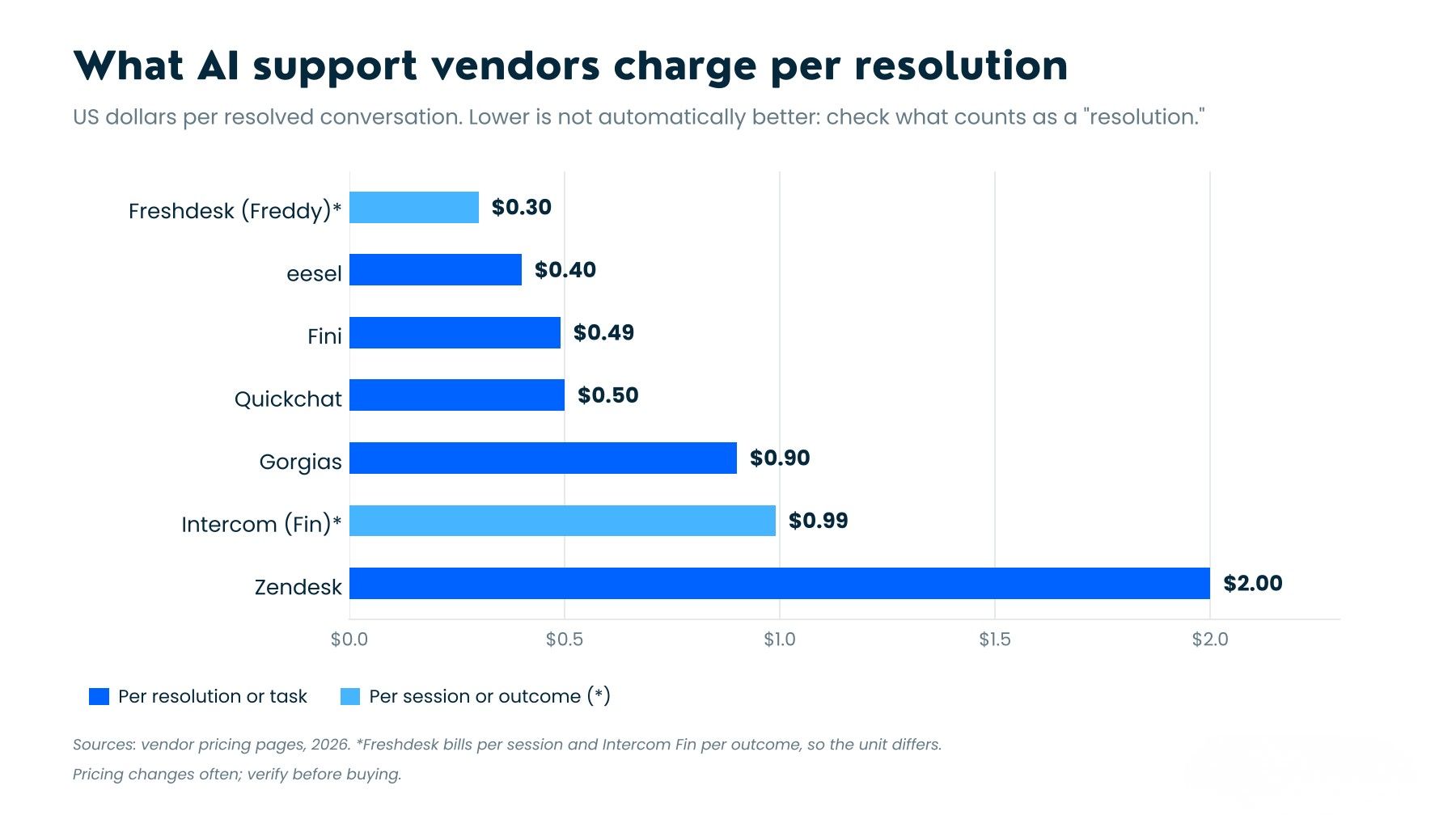
Per-resolution pricing
You pay only when the AI resolves a ticket without human involvement.
Quickchat AI: $0.50/resolution
Intercom Fin: $0.99/resolution
Zendesk: $2.00/automated resolution
Gorgias: $0.60-$1.27/resolution depending on plan tier
Fini: $0.49-$0.89/resolution depending on volume tier
Risk: What counts as a "resolution" varies by vendor. Intercom bills when a customer exits without asking for more help, which can include customers who gave up.
Per-seat AI add-on
$50-$80 per agent per month on top of the base helpdesk plan.
Looks cheaper at low volume. Gets expensive when you realize the AI add-on often ships with limited triage and no CRM write actions on cheaper tiers.
Risk: Your cost does not decrease as AI improves. You pay the same whether the AI resolves 30% or 80%.
Flat platform fee
$30-$500/month depending on feature tier and volume caps.
Best for predictable budgeting. Worst for scaling, because you hit volume caps and jump to the next tier.
Risk: Watch for double billing. Some platforms charge both a helpdesk ticket fee AND an AI resolution fee on the same conversation.
Sources: vendor pricing pages as of September 2026; Aissist.io 18-vendor benchmark; aitoolsbakery.com September 2026 audit
Implementation Sequence: Pilot to Production in 90 Days
Most mid-market deployments follow a three-phase rollout. Trying to skip phases is how you end up with the hallucination headline.
Phase 1: Audit and scope (Weeks 1-2)
- Pull 90 days of ticket data. Tag every ticket by category: order status, login/access, billing, returns, product questions, complaints, technical issues.
- Calculate volume and current cost per category.
- Identify the Tier 1-A categories (near-deterministic, highest volume). These are your Phase 2 scope.
- Audit your knowledge base. AI cannot retrieve what does not exist. Fill the gaps before you deploy.
Phase 2: Controlled pilot (Weeks 3-6)
- Deploy on one channel (chat or email, not both) for one or two Tier 1-A categories only.
- Start in "assist mode": AI drafts the response, human reviews and sends. This builds your validation dataset.
- Measure: accuracy rate, hallucination rate, CSAT on AI-assisted vs. human-only, escalation quality.
- Minimum pilot: 500 AI-handled conversations before making any scale decision.
Phase 3: Expand and automate (Weeks 7-12)
- Move validated categories to full auto-resolve (AI sends directly, human reviews a sample).
- Add Tier 1-B categories (billing, returns) with stricter confidence thresholds.
- Build the escalation feedback loop: every escalated ticket feeds back into the knowledge base.
- Set up ongoing monitoring: weekly hallucination audits, CSAT tracking by channel, resolution rate by category.
The metric that matters: Do not optimize for deflection rate alone. Measure resolution rate (ticket actually solved) alongside repeat-contact rate (customer came back within 48 hours about the same issue). A high deflection rate with a rising repeat-contact rate means your AI is closing tickets it should be escalating.
What Separates a Good Deployment from a Headline-Making Failure
64% of enterprise CX teams ran an agentic AI pilot in 2026, but only 27% reached full production. The gap is not the AI model. It is five operational decisions:
- Scope discipline. Start with 2-3 ticket categories, not "all tier-1." Expand after validation, not before.
- Knowledge base quality. Hallucinations cluster in topics where retrieval grounding is weakest. Fix the data layer, not the model.
- Resolution definition. Get your vendor's definition of "resolved" in writing. An assumed resolution (customer left without asking more) is not the same as a verified resolution (customer confirmed the issue is fixed).
- Escalation design. The AI must pass full context to the human agent. A ticket that escalates as "customer needs help" instead of "customer asked about return eligibility for order #12345, purchased 28 days ago, within 30-day window, but item shows signs of wear" creates more work than it saves.
- CSAT as a circuit breaker. If AI-handled CSAT drops more than 5 points below human-handled CSAT for the same category, pause automation on that category and diagnose before continuing.
Bottom Line
An AI agent for customer support is not a chatbot that posts help articles. It is an operational system that reads tickets, checks your backend systems, executes documented workflows, and escalates everything it is not confident about.
The tier-1 tickets you are paying $15 to $25 to resolve, the ones that follow the same script every time, are the 50 to 70% of your volume where AI delivers 90%+ cost reduction with equal or better CSAT, but only if the containment architecture prevents the AI from ever guessing.
The question is not whether AI can handle your tier-1 tickets. The data says it can. The question is whether your deployment has the four containment layers that prevent the one hallucinated response that undoes the other 3,899 correct ones.
If you are building an AI agent for customer support and need the containment architecture built right the first time, see how Ontik builds AI agents or book a meeting to scope your tier-1 automation.
Automate Tier-1 Support With an AI Agent
Stop paying human rates for password resets and order status. Talk to Ontik about an AI support agent built around your knowledge base.