AI Automation for Small Business: Use Cases, Tools, Costs & Implementation
AI automation for small business means using artificial intelligence tools to handle repetitive tasks without constant human input. Think automatic email responses, invoice processing, or customer chat replies.
This is different from traditional automation because AI can actually understand context and make decisions, not just follow rigid if-then rules. Small business owners save an average of 15 to 20 hours per week using AI automation tools, according to recent surveys.
The technology is now accessible with platforms starting at $50 per month. You can implement basic automations in one afternoon. This guide covers practical use cases across customer support, sales, marketing, and operations.
You will learn which AI tools for small businesses work best for specific tasks, what they actually cost, and how to implement them without technical skills. We also address common mistakes and security concerns. The goal is to help you choose your first automation and measure real results. Modern AI and machine learning solutions make this possible for businesses of any size.
AI Automation Use Cases by Business Function
Here are the most practical applications of AI automation for small businesses. Each category addresses specific pain points that business owners likely face daily. Understanding these use cases helps you identify quick wins that deliver immediate value. The right automation can transform how your team works, freeing up hours for revenue-generating activities. Smart business owners start with one category and expand systematically. This focused approach builds confidence and demonstrates ROI before a major investment. Whether you run a startup or an established small business, these automations deliver measurable results within weeks of implementation.
Customer Support Automation
Customer support automation handles up to 70% of routine questions without human involvement. AI chatbots answer common questions instantly, work 24/7, and never get tired or frustrated. The technology has matured significantly, making it reliable for businesses to automate customer interactions without sacrificing quality.
Key advantages of AI chatbots over traditional systems:
- Understand intent and context, not just exact phrases
- Handle question variations naturally (e.g., "Where is my order?" vs. "track my package")
- Reduce customer frustration and support tickets
- Enable proper intent detection and natural language understanding
- Scale infinitely without additional headcount costs
Smart escalation rules ensure complex issues reach humans. You set thresholds for when the bot should hand off conversations after three failed attempts or when customers use words like "angry" or "frustrated." The handoff to humans happens seamlessly, preserving conversation history so customers never repeat themselves.
Knowledge base automation pulls answers from your help docs, past tickets, and FAQs. Your AI assistant learns from existing content automatically. Update one document and every future conversation reflects that change. No need to retrain the bot or update complex decision trees. The system continuously improves as you add more documentation.
Multilingual support translates responses in real time without hiring translators. Professional AI chatbot solutions providers in Dubai can help implement these conversational AI systems effectively. This capability opens global markets without language barriers or timezone limitations.
Advanced features include:
- Ticket routing based on complexity and department expertise
- Agent assist capabilities suggesting responses to human agents
- SLA tracking for first response time and resolution time
- Deflection rate and CSAT measurement with detailed analytics
- Conversation logs with PII redaction for compliance requirements
These features work together to create a seamless support experience. Customers get instant answers to simple questions while complex issues reach the right specialist immediately. Your support team handles fewer repetitive questions and focuses on problems requiring human judgment and empathy.
Sales Automation
Sales automation focuses on moving leads through your pipeline faster. AI helps businesses by handling the repetitive parts so your team can focus on closing deals. The difference between manual and automated sales processes is dramatic. Teams using automation close 30% more deals while spending less time on administrative tasks.
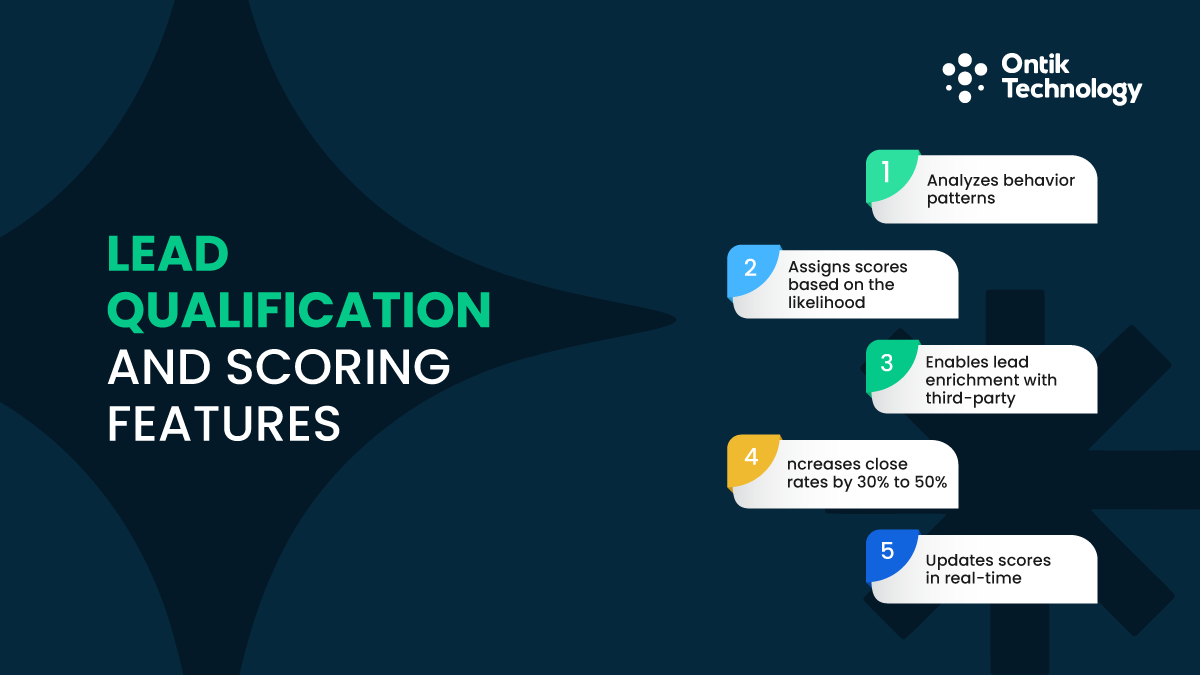
Lead qualification and scoring features:
- Analyzes behavior patterns (email opens, website visits, demo requests)
- Assigns scores based on likelihood to buy using firmographics
- Enables lead enrichment with third-party data sources
- Increases close rates by 30% to 50% through better prioritization
- Updates scores in real-time as prospect behavior changes
Here is how scoring works in practice. Someone visits your pricing page three times, downloads a case study, and opens two follow-up emails. The system gives them an 85 out of 100 score. Someone else just browsed the homepage once and gets a 20. Your sales team calls the 85 first, maximizing time spent with ready-to-buy prospects.
CRM updates and pipeline hygiene used to drain hours each week. AI now logs calls, updates deal stages, and fills in missing information by reading emails through conversation intelligence. Deduplication happens automatically, cleaning your database continuously. After a sales call, the AI system reads your meeting notes and automatically updates the contact record, changes the pipeline stages, and sets a follow-up reminder. This eliminates the manual data entry that sales reps often skip.
Meeting scheduling automation eliminates the back and forth. Share your availability link and the prospect picks a time that works for both of you in one click. The system handles timezone conversions, sends calendar invitations, adds video meeting links, and sends automated reminders before the call.
Personalized outreach at scale means sending hundreds of emails that feel individual through sales cadence and drip sequence workflows. AI customizes each message based on prospect data, pulling their company name, industry, recent news, and pain points. Response rates go up 40% to 60% compared to generic blasts. Advanced tools provide call summaries and forecasting models to help qualify MQL/SQL leads more effectively. The AI can also suggest optimal send times based on when each prospect typically engages with emails.
Marketing Automation
Marketing automation handles content creation and distribution. This frees you to focus on strategy instead of execution. AI marketing tools have become essential management tools for small teams competing against larger companies with bigger budgets. The playing field levels when you use AI to multiply your output.
Content creation benefits:
- Drafts blog posts, social media updates, and email newsletters faster
- Reduces 3-hour tasks to 45 minutes with quality maintained
- Leverages generative AI for visual content and video scripts, utilizing tools like Seedance 2.0 to streamline video production and enable faster, scalable content creation.
- Maintains consistent brand voice across channels automatically
- Suggests trending topics based on industry conversations
Content repurposing workflows turn one piece into many formats. Write a 2,000 word blog post and the AI pulls out key points for social media, creates email snippets for your newsletter, generates video script outlines, and suggests infographic data points. Those video script outlines can go a step further too, turned into finished clips through Seedance 2.5, one of the newer models Higgsfield runs alongside 15+ others. One piece becomes 10 to 15 touchpoints. This multiplier effect maximizes the value of every piece of content you create.
SEO workflow automation provides:
- Topic clustering and search intent analysis for better rankings
- Keyword opportunities based on SERP analysis and search volume
- Readability scores to ensure clarity for target audiences
- Internal linking and schema markup recommendations automatically
- Real-time optimization suggestions as you write content
- Competitor content gap analysis showing what you should cover
Ad creative testing runs automatically through A/B testing. You create 5 headlines and 3 images for Facebook ads. The platform tests all 15 combinations, identifies the best performer after 100 clicks, and allocates 80% of budget there while tracking ROAS, CAC, CTR, and CVR metrics. This continuous optimization improves campaign performance without manual intervention.
Email marketing platforms enable lifecycle emails with proper segmentation and GA4 attribution tracking. Many AI tools offer predictive analytics to optimize send times and subject lines automatically. The system learns which subject lines work best for different segments and when each subscriber typically opens emails.
Operations Automation
Operations automation streamlines internal processes. These behind-the-scenes tasks keep your business running but do not directly generate revenue. Business process automation saves countless hours weekly that your team can redirect to customer-facing activities. The cumulative effect of small operational efficiencies creates significant competitive advantages.
Scheduling and coordination capabilities:
- Finds meeting times automatically without email chains
- Checks all calendars and identifies open slots instantly
- Sends one invitation everyone accepts with video links
- Completes in 30 seconds instead of 30 minutes manually
- Handles timezone conversions for distributed teams
Document handling and data extraction pulls information from PDFs, scans, and images through OCR/extraction technology. The AI reads vendor invoices regardless of format, extracts amounts, dates, line items, and tax information, performs PO matching, and flags discrepancies with validation rules. Error rates drop from 3% to 5% down to under 0.5%. This accuracy improvement prevents costly mistakes and reduces time spent fixing errors.
SOP automation ensures consistent processes through runbooks and checklists. New hires onboard faster because they follow interactive checklists instead of reading manuals. This is essentially RPA (Robotic Process Automation) for small business workflows. Every task gets completed the same way regardless of who handles it, maintaining quality standards.
Intake forms and approval workflows route requests automatically with task routing. Process mapping and bottleneck analysis help identify where exception handling is needed, while understanding cycle time optimizes these workflows further. The system enforces approval hierarchies without anyone needing to remember complex rules. Requests move through your organization efficiently with full audit trails showing who approved what and when.
AI Automation Tools & Platforms for Small Businesses
The tool landscape can feel overwhelming. Here is what actually matters when businesses are looking to implement AI automation. Choosing the right tools determines success or frustration. Focus on platforms with strong integrations, active user communities, and clear documentation. These factors matter more than flashy features you may never use. Start with proven tools used by thousands of businesses before exploring niche solutions.
Workflow Automation Platforms
These workflow platforms connect your existing tools and automate workflows between them. No coding required. Small businesses can use these automation tools to build sophisticated process automation without technical teams. The visual interfaces make automation accessible to anyone willing to invest a few hours learning the basics.
Most automations work through triggers and actions. A trigger starts the workflow. An action is what happens next. For example, when a form is submitted (trigger), create a CRM contact and send a Slack message (actions). You can chain unlimited actions together to replicate complex manual processes.
Understanding this trigger-action relationship is crucial. Every automation starts with something happening, then actions occur in sequence to automate repetitive tasks effectively. The platforms provide templates for common workflows, letting you implement proven automations in minutes. You can customize these templates to match your specific business needs.
Webhooks become necessary for custom integrations. They let apps talk to each other in real time. Think of webhooks as notifications one app sends to another when something happens. Most small businesses can avoid them initially by using pre-built connections. The major platforms support thousands of apps out of the box.
Category-Specific AI Tools
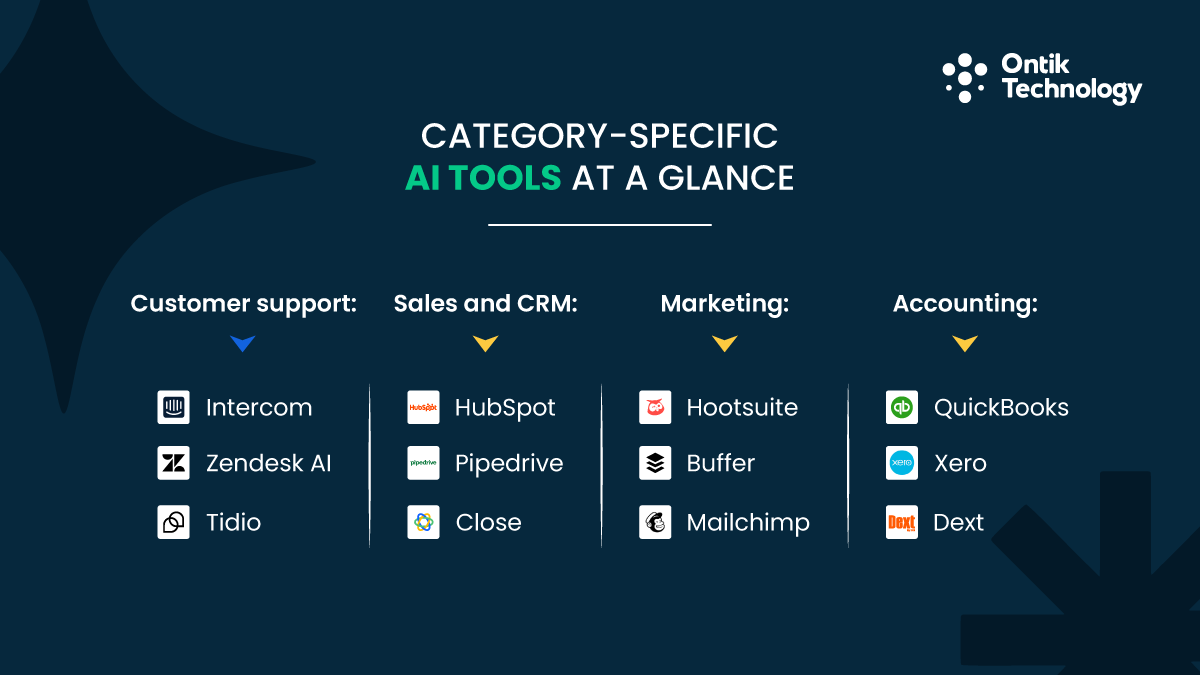
Beyond workflow platforms, specialized tools handle specific business functions with built-in AI capabilities. These best AI tools for small business offer pre-built automation features designed for specific use cases. They require less configuration than general workflow platforms but provide deeper functionality for their specialty.
For customer support:
- Intercom starts at $74/month with chatbots and lead qualification
- Zendesk AI costs $55/month per agent with automated ticket routing
- Tidio offers a free AI plan with basic responses
For sales and CRM:
- HubSpot has a free CRM with AI email writing and meeting scheduling
- Pipedrive starts at $14/month with AI sales assistant features
- Close focuses on outbound sales automation at $49/month
For marketing:
- Hootsuite includes AI content suggestions at $99/month
- Buffer offers social scheduling with AI captions from $6/month
- Mailchimp provides email automation with AI optimization starting free
For accounting:
- QuickBooks has AI expense categorization at $30/month with chart of accounts automation and GL coding
- Xero includes bank feed automation at $13/month with payment terms tracking
- Dext automates receipt capture and data entry at $10/month with duplicates detection
Accounting automation includes cash conversion cycle tracking, variance analysis, and forecasting models for advanced financial planning. These tools connect directly to bank accounts and credit cards, automatically importing transactions and suggesting categorizations based on past patterns.
Many businesses benefit from custom software development services when off-the-shelf tools do not fit their specific workflows. Custom solutions integrate with legacy systems and handle unique business processes that generic software cannot accommodate. This investment makes sense when process advantages create competitive differentiation.
Costs, ROI & Budgeting for AI Automation
Understanding real costs helps you budget appropriately and measure success accurately. The benefits of AI automation extend beyond simple time savings to include error reduction, revenue growth, and competitive positioning. Most small businesses underestimate returns while overestimating complexity. The financial case for automation strengthens as you implement more workflows and compound efficiency gains.
How Much Does AI Automation Cost?
AI automation for small business typically costs between $50 and $500 monthly for software subscriptions. The range depends on how many tools you use and which features you need. According to the Small Business AI Adoption survey, a typical small business spends around $1,800 annually on AI tools. Hidden costs like training and maintenance add to this base, but remain minimal compared to the value generated.
Cost breakdown by business stage:
- Basic stack: Zapier ($19.99) + ChatGPT Plus ($20) + Tidio ($29) = $69/month
- Growing businesses: $200-$300 with CRM, email marketing, and accounting automation
- Established companies: $500-$800 across full technology stack
Setup and implementation costs:
- DIY setup: 10-20 hours of your time
- Freelancer help: $500 for simple work
- Agency implementation: $5,000 for complex systems
Training takes 2 to 4 hours for basic tools. Ongoing maintenance requires 2 to 5 hours monthly checking workflows, updating rules, and fixing broken connections. These time investments decrease as your team becomes proficient with the platforms. Most businesses find maintenance becomes routine after the first quarter, requiring minimal attention for stable workflows.
Measuring ROI of AI Automation
Calculate ROI by comparing time saved against total costs. Here is a simple framework that works for most small businesses and startups. Track metrics monthly to identify which automations deliver the best returns. This data guides decisions about where to expand automation efforts next.
Three key ROI metrics:
- Time saved: If customer support automation saves 15 hours weekly (60 hours monthly) at $25/hour loaded cost, you save $1,500 in labor value
- Error reduction: Automated data extraction reduces error rates from 3-5% down to under 0.5%, preventing costly rework and customer complaints
- Revenue impact: Responding to leads within 5 minutes increases conversion rates by 400%. Closing 2 extra deals monthly worth $2,000 each adds $4,000 in revenue
Simple ROI formula: Monthly time saved (hours) × hourly rate - monthly software costs
Example: 60 hours saved × $25/hour ($1,500) - $200 tools = $1,300 net monthly benefit (550% ROI)
This formula simplifies complex calculations into actionable numbers. Apply it to each automation individually to identify your highest-value workflows. Some automations will show modest returns while others deliver 10x or more. Focus expansion efforts on automation types showing the strongest performance in your specific business context.
Budget-Based Automation Stacks
Your budget determines which automations to prioritize. Here are three proven combinations that deliver results and help small businesses scale effectively. Each tier builds on the previous one, creating a logical progression as your business grows and automation sophistication increases.
Small businesses and startups implementing AI automation report time savings of 15 to 30 hours weekly within three months. The starter tier proves the concept with minimal investment. The growth tier supports scaling teams. The established tier enables enterprise-grade automation at small business prices.
According to McKinsey's 2025 State of AI report, nearly nine out of ten organizations are now regularly using AI, with successful implementations delivering measurable enterprise-wide financial impact. Progression through these tiers aligns with revenue growth, ensuring automation investment stays proportional to business size.
How to Implement AI Automation
Implementation success depends on starting simple and building systematically. Here is the step by step process that works when businesses looking to leverage AI start their automation journey. Following this framework reduces frustration and increases success rates. Most failed automation projects skip these fundamentals and jump straight to complex implementations.
What to Automate First
Choose tasks that are high volume and low complexity. The best first automations happen frequently and follow predictable patterns. Prioritization matters because early wins build momentum and organizational buy-in for larger projects.
Three starter automations for any business:
- Form submissions to email and CRM - Takes 30 minutes to set up, ensures no lead falls through cracks
- Appointment confirmations - Reduces no-shows by 30-40% via email or SMS
- Invoice data extraction - Eliminates 5-10 hours weekly of manual entry
These automations share common characteristics. They happen multiple times per day, follow the same steps every time, currently waste valuable staff hours, and have clear success criteria. These use cases demonstrate how AI can help automate tasks effectively. Each delivers measurable value within the first week of operation.
Avoid automating edge cases initially. Complex scenarios with many exceptions cause more problems than they solve. Master simple, repetitive workflows first before tackling tricky processes. Edge cases can wait until you have 3 to 5 successful automations under your belt. This disciplined approach prevents the common mistake of attempting too much too soon.
Step-by-Step Implementation Process
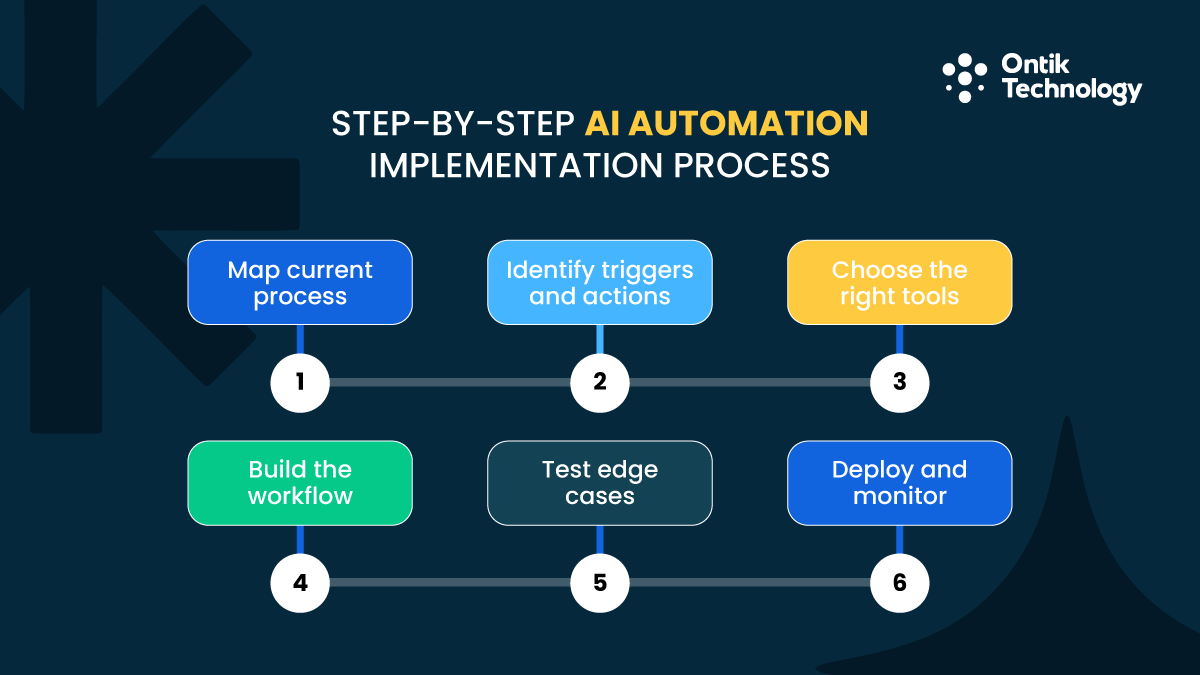
Follow these six steps for every automation you build to prevent common mistakes and ensure reliable results. This process has been refined through thousands of implementations across different industries and business sizes.
Implementation steps:
- Map your current process - Write down every action from start to finish, including the annoying parts and where things go wrong
- Identify triggers and actions - Define what starts the workflow and what happens next, mapping data fields between systems
- Choose your tools - Select a workflow platform and verify all tools have available integrations
- Build the workflow - Connect trigger to actions using visual builders, configure templates, and map data fields
- Test edge cases - Try incomplete data, long inputs, unusual formatting to identify issues before going live
- Deploy and monitor - Watch closely for the first week, check data flows correctly, verify outputs, monitor error logs
Businesses with technical teams can explore dedicated development team options for complex automation projects requiring custom coding. This approach makes sense when automation needs exceed what no-code platforms can deliver. Custom development provides unlimited flexibility but requires ongoing technical maintenance.
Common Implementation Mistakes
Most automation failures come from predictable mistakes. Avoiding these saves hours of troubleshooting and prevents frustration that derails automation initiatives before they gain traction.
Top mistakes to avoid:
- Starting too complex - Automate one step at a time instead of entire processes
- Ignoring data quality - Clean your data before automating to prevent amplifying errors
- No human oversight - Build in review steps for important communications
- Poor documentation - Document trigger conditions, data mappings, and exception rules
Each mistake seems minor but compounds over time. Starting too complex leads to troubleshooting nightmares. Dirty data creates thousands of incorrect records. Lack of oversight damages customer relationships. Poor documentation means only one person can fix problems. Address these issues proactively through disciplined implementation practices.
When to Hire Help
Some automation projects benefit from professional help. Know when DIY stops making sense and when expertise accelerates results beyond what internal efforts can achieve.
When to hire professionals:
- Automation requires custom code or API work
- You are spending more than 10 hours trying to connect systems
- Complex implementations covering multiple departments needed
- Integration with legacy systems or proprietary software
Options and pricing:
- Freelancers: $50-$150 hourly for specific technical tasks (5-10 hours typical)
- Agencies: $3,000-$10,000 for comprehensive implementations with strategy and training
Consider MVP development services when building custom automation solutions that might scale into full products. This approach validates concepts before committing to expensive custom development. The iterative nature of MVP development aligns perfectly with automation projects where requirements evolve as you learn what works.
Security, Privacy & Compliance Considerations
Automation introduces security and compliance risks you must address. These basics apply to most small businesses implementing AI technologies. Ignoring security creates liability that far outweighs automation benefits. Build security into your implementation process from day one rather than retrofitting it later.
AI Automation Security Basics
Essential security measures:
- Enable two-factor authentication on every platform
- Use principle of least privilege for access controls
- Review audit logs monthly for unusual patterns
- Monitor failed authentication attempts and unexpected data transfers
- Rotate passwords quarterly for all automation platforms
Access control matters more than ever with automation. Give systems only the access they need to function. Your chatbot needs read access to your knowledge base but not write access to delete articles. This principle limits damage if credentials are compromised. Each tool should have its own unique credentials rather than sharing admin passwords across platforms.
Security breaches through automation platforms are increasingly common. Attackers target these systems because they connect to multiple business applications. A single compromised automation account can access your CRM, email, accounting, and more. Strong security practices protect your entire technology ecosystem through automation platform hardening.
Data Privacy in AI Automation
Not all data should flow through AI tools. Personal health information, financial account numbers, and social security numbers require special handling through employee records systems with proper redaction. Many automation platforms explicitly prohibit sensitive data in their terms of service.
Privacy best practices:
- Strip sensitive information before automation processes it
- Check vendor terms of service regarding data usage and training
- Verify commitments to data residency, encryption, and retention limits
- Look for bias mitigation and fairness guarantees in AI tools
- Implement data minimization principles in all workflows
Consider where your data physically resides. Some platforms store data in specific countries due to privacy regulations. EU customers may require GDPR-compliant storage. Healthcare data needs HIPAA-compliant infrastructure. Understand these requirements before implementing automations handling sensitive information. Violations can result in significant fines and loss of customer trust.
Industry-Specific Compliance
Regulatory requirements by industry:
- Healthcare: HIPAA compliance with business associate agreements and encryption
- Financial services: PCI DSS compliance for payment data using payment processor APIs
- EU customers: GDPR compliance with proper consent mechanisms and data deletion procedures
- Legal services: Attorney-client privilege protections in document handling
- Education: FERPA compliance for student records
Consult with compliance experts before automating regulated data. The cost of violations far exceeds the cost of proper implementation. Many automation platforms offer compliance certifications for specific regulations. Choose platforms with relevant certifications for your industry to simplify compliance maintenance.
Best Practices & Governance for AI Automation
Following proven best practices helps automation deliver consistent value over time. These guidelines ensure responsible use of AI and maximize benefits for your small business.
Key governance principles:
- Start small and prove value before scaling to additional departments
- Document everything immediately with workflow diagrams and decision logic
- Keep humans in the loop for critical decisions affecting customer relationships
- Review workflows monthly as business processes change and tools update
- Track metrics quarterly: time saved, error rates, customer satisfaction, conversion rates, response times
- Avoid over-automation of personal relationships and creative strategy
- Establish clear ownership for each automation workflow
- Create escalation procedures when automations fail
Advanced AI should enhance human capabilities, not replace them entirely. Automate repetition, not relationship building. The best implementations augment human judgment rather than attempting to eliminate it completely. Customers still value human interaction for complex issues and relationship-building moments.
Governance becomes increasingly important as automation expands. Establish a center of excellence to review new automation proposals, maintain documentation standards, and share best practices across teams. This centralized approach prevents duplicate efforts and ensures consistent quality across all automation initiatives.
Industry-Specific AI Automation
While core automations apply across industries, specific verticals have unique opportunities worth exploring. Each industry has developed specialized workflows optimized for common business processes. Learning from these patterns accelerates your automation journey.
Restaurants: Online ordering with kitchen displays, reservation confirmations, table management, SKU/catalog management, post-purchase flows, review moderation and sentiment analysis, loyalty program automation, dietary restriction tracking
Real estate: Property listing distribution, showing confirmations, lead scoring, document preparation, Google Business Profile management, local SEO, NAP consistency, virtual tour scheduling, commission calculations, compliance document tracking
Law firms: Document assembly, deadline tracking, client intake routing with ATS-like screening, billing automation, evaluation rubrics, background checks, conflict of interest checks, time tracking integration, legal research automation
Clinics: Appointment reminders (40-50% no-show reduction), insurance verification, patient intake forms, follow-up instructions, call tracking, IVR, voicemail transcription, reputation management, prescription refill requests, lab results notification
Marketing agencies: Client reporting from multiple platforms, content approval workflows, campaign performance alerts, AI agents for routine communications, timesheet automation, project status updates, asset library management
Ecommerce: Inventory updates with product attributes, shipping notifications, automated review requests, RMA/refunds workflows, abandoned cart recovery, dynamic pricing, product recommendation engines, customer segmentation
Accountants: Client data collection portals, scheduled report generation, tax document preparation, deadline tracking, engagement letter automation, secure file sharing, bank reconciliation, expense categorization
Home services: Scheduling with travel time and skills consideration, appointment reminders, arrival notifications, automated invoicing, offer letters, reputation management, parts ordering, warranty tracking, service history maintenance
Industry-specific platforms often include pre-built automations addressing common pain points in your vertical with specialized interview kit features. These vertical solutions typically deliver faster time-to-value than horizontal platforms because they understand industry workflows natively.
Building Your AI Automation Roadmap
You now have the framework for implementing AI automation in your small business. Start by choosing one high impact, low complexity task from your daily workflow. This is how small businesses can use AI most effectively.
Spend one afternoon setting up your first automation using budget-friendly tools. Measure time saved in the first month, then add a second automation addressing your next biggest pain point. Most small businesses achieve 15 to 20 hours weekly time savings within 90 days.
Focus on workflows where speed and consistency matter most. Document as you go and review monthly. Explore our process for guidance on systematic implementation. The AI adoption journey requires patience and persistence.
Small businesses can use AI automation to compete with larger enterprises by working smarter. Tools can also scale with your growth, adding AI-powered tools as needs evolve. Remember that automation should enhance your business, not complicate it. Keep things simple, measure everything, and scale what works. AI can help you reclaim time for strategic thinking and customer relationships while driving sustainable business growth.
Finall Thoughts
AI automation can save a small business a lot of time by handling repetitive work like customer replies, lead follow-ups, invoices, and content posting. Start with one simple task that happens every day, set it up in an afternoon, and track the hours you save. Once you see results, add the next automation step by step. Keep it simple, check your workflows monthly, and protect customer data with basic security settings. Done right, AI helps you work faster, reduce mistakes, and focus more on growing your business.

.avif)